



Picture of admin

admin

THE NARRATIVE BEHIND THE WORDS

Let's Checkout Our All Latest Blogs

Building Your First AI Workflow: A Practical Guide for Non-Technical Teams

AI is no longer something only developers or data scientists use. In 2026, AI workflows are quietly running inside marketing teams, HR departments, sales operations, customer support desks, and even small businesses with no technical staff at all. If you can explain a process in plain language, you can build an AI workflow.


This guide is written for non-technical teams who want to work smarter, save time, and reduce repetitive work without learning code or hiring engineers. By the end of this article, you will understand what an AI workflow is, why it matters, and how to build your first one step by step.


Many teams struggle not because AI is difficult, but because workflows are built without understanding real operations. ConceptRecall specializes in practical AI workflow automation, focusing on clarity, adoption, and measurable outcomes.

Why AI Workflows Are No Longer Just for Developers

For years, automation felt complicated and expensive. Businesses believed AI required custom software, technical teams, and long implementation cycles. That is no longer true.


Today’s AI tools are designed for everyday users. They connect to tools you already use, such as email, spreadsheets, CRMs, forms, and messaging apps. More importantly, modern AI workflows focus on decisions, not just tasks. Instead of only moving data from one place to another, AI can read, understand, summarize, classify, and recommend actions.


Non-technical teams are now leading AI adoption because they understand the work best. They know where time is wasted, where mistakes happen, and where faster decisions would make the biggest impact.

What is an AI Workflow?

An AI workflow is a series of steps where AI helps move work forward automatically. When something happens, AI looks at the information, makes a decision or creates something, and then takes the next action.


For example:

  • A customer fills out a form
  • AI reads the response
  • AI decides if it is urgent or not
  • The message is sent to the right person automatically


That entire flow is an AI workflow.


The key difference between traditional automation and AI workflows is intelligence. Traditional automation follows fixed rules. AI workflows can understand language, patterns, and context, which makes them much more flexible and useful for real business work.

Why Non-Technical Teams Need AI Workflows Now

Workload pressure is increasing across every department. Teams are expected to move faster, respond quicker, and handle more tools than ever before. At the same time, budgets are tighter and hiring more people is not always an option.


AI workflows help teams:

  • Reduce repetitive manual work
  • Improve consistency and accuracy
  • Respond faster to customers and leads
  • Focus on high-value tasks instead of busywork


By 2027, over 70% of business automation is expected to be powered by AI-augmented workflows rather than traditional rule-based systems. This shift means that businesses adopt AI early quick, repetitive processes while improving decision-making, without needing technical staff or complex coding skills.

Common Myths About AI Workflows

Many non-technical teams delay AI adoption because of misconceptions.

One common belief is that you need coding skills. In reality, most modern AI workflow tools are visual. You connect steps like building blocks and write instructions in plain language.


Another myth is that AI workflows are expensive. While enterprise AI solutions can be costly, many no-code tools are affordable and scalable. Teams often recover the cost simply by saving time in the first few weeks.


There is also fear that AI replaces jobs. In practice, AI workflows usually remove the least enjoyable parts of work such as copying data, sorting messages, and repeating the same steps daily, while leaving decision-making and creativity to humans.

The Basic Building Blocks of an AI Workflow

Every AI workflow, no matter how simple or advanced, has a few core parts.

  • First, there is a trigger. This is what starts the workflow. It could be a form submission, an email arrival, a new spreadsheet row, or a scheduled time.
  • Next comes the input. This is the information the AI works with. It might be text, customer details, feedback, or documents.
  • Then comes the AI step. This is where intelligence is added. The AI might summarize text, classify a request, generate a response, or decide what should happen next.
  • After that is the action. This could be sending an email, updating a record, notifying a team member, or creating a task.
  • Finally, strong workflows include a feedback or review step, where humans can check results or help improve accuracy over time.


Understanding these blocks makes building workflows far less intimidating.


Book a strategy session with ConceptRecall today and discover a custom roadmap for your first AI workflows.

Step-by-Step: Building Your First AI Workflow

Step 1: Identify a Repetitive Task

Start small. The best first AI workflow solves a task your team repeats daily or weekly.


Examples include sorting inquiries, summarizing meeting notes, qualifying leads, responding to common questions, or preparing reports. If a task feels boring, predictable, or time-consuming, it is a strong candidate. Avoid complex decision-making tasks at the beginning. Simplicity builds confidence and trust.

Step 2: Define the Outcome, Not the Tool

Non-technical teams often get stuck choosing tools too early. Instead, focus on the result you want.


For example, instead of saying, “We need an AI tool,” say, “We want all customer messages sorted by urgency within five minutes.”

Clear outcomes make tool selection easier later and prevent over-engineering.

Step 3: Choose a No-Code or Low-Code Platform

Look for platforms designed for business users. These tools usually offer visual builders, simple language instructions, and built-in AI features.


A good beginner platform should connect easily to your existing tools, allow AI steps without complex setup, and provide testing or preview options so you can see results before going live. The goal is control and clarity, not technical power.

Step 4: Design the Workflow Logic in Plain Language

You do not need technical diagrams. Simply describe the process as a sequence of decisions.


For example: When a message arrives, AI reads it. If it sounds urgent, notify the manager. If not, add it to the support queue. This “if this, then that” thinking is enough to design most workflows. Many platforms allow you to write this logic almost exactly as you would explain it to a colleague.

Step 5: Add AI Intelligence Carefully

This is where AI adds value. Start with simple tasks like summarization, categorization, or drafting responses.


When using AI prompts, be clear and direct. Instead of long explanations, give simple instructions such as: Summarize this message in one sentence and label urgency as high, medium, or low. Clear instructions improve accuracy and consistency.

Step 6: Test, Observe, and Improve

Before fully launching, test the workflow with real examples. Observe where AI performs well and where it needs adjustment.


AI workflows improve over time when teams review outputs and refine instructions. Treat your first workflow as a learning experience, not a final product.


Teams that implement AI workflows report saving 30–50% of their time on repetitive tasks such as sorting emails, qualifying leads, or summarizing reports. This allows employees to focus on strategic, creative, or customer-facing work instead of busywork.

Real-World AI Workflow Examples for Non-Technical Teams

  • Marketing teams often use AI workflows to review content drafts, summarize campaign performance, or generate social captions based on briefs.
  • Customer support teams rely on AI to classify tickets, suggest replies, and prioritize urgent cases.
  • Sales teams use workflows to score leads, summarize calls, and prepare follow-up emails.
  • HR teams automate resume screening, interview scheduling, and policy question responses.
  • Operations teams use AI workflows to generate reports, monitor issues, and notify stakeholders automatically.

Common Mistakes to Avoid When Starting

One common mistake is trying to automate everything at once. This often leads to confusion and mistrust in the system.


Another issue is poor input quality. AI can only work with the information it receives. Clear forms and clean data improve results dramatically. Skipping human review early on is also risky. Initial oversight builds confidence and prevents small errors from becoming bigger problems. Finally, avoid scaling too quickly. Stability matters more than complexity.


How to Measure AI Workflow Success

Success is not just about automation. Measure how much time your team saves, how consistent outputs become, and whether errors decrease. Team adoption is also critical. If people trust and use the workflow willingly, it is working. Over time, successful workflows feel invisible, they simply make work smoother.

When to Scale or Add More AI Workflows

Once your first workflow runs smoothly, scaling becomes natural. Signs you are ready include consistent accuracy, reduced manual effort, and positive team feedback.


At this stage, teams often connect workflows together, moving from task automation to decision support. This is where AI truly transforms operations.

FAQs: AI Workflow Basics for Non-Technical Teams


What is an AI workflow in simple terms?

An AI workflow is a series of steps where AI helps complete work automatically. It starts with an event, uses AI to understand or decide something, and then takes an action, such as sending a message or updating a record.


Can non-technical teams really build AI workflows?

Yes. Modern AI tools are designed for non-technical users. If you can describe a process clearly, you can usually build a working AI workflow using no-code platforms.


How long does it take to build a first AI workflow?

Simple workflows can be built in a few hours or days. Most teams see useful results within the first week, especially when starting with a small, focused task.


Are AI workflows expensive?

Many tools offer affordable plans. Most teams recover costs quickly through time savings and efficiency improvements.


Do AI workflows replace human jobs?

No. AI workflows reduce repetitive work and support better decisions. They help people focus on creative, strategic, and human-centered tasks.


Conclusion

Building your first AI workflow is no longer a future experiment, it is becoming a practical requirement for teams that want to stay efficient and competitive. As AI adoption accelerates in 2026, businesses are moving away from rigid automation toward AI-driven workflows that support decisions, not just tasks.


Industry trends show that non-technical teams using no-code AI workflows reduce manual effort by up to 40–60% while improving response speed and internal accuracy. Another major shift is the rise of human-in-the-loop AI, where teams stay in control while AI handles repetitive and data-heavy work.


ConceptRecall specializes in designing AI workflows specifically for non-technical teams, focusing on real business processes not overengineered tools. Our approach helps teams start small, build confidence, and scale workflows that actually get used.


From marketing and operations to customer support and internal automation, ConceptRecall turns everyday tasks into intelligent workflows that save time and reduce friction. Contact us now!

What is AI Workflow and Why Businesses Are Replacing Manual Processes in 2026

Manual processes once defined how businesses operated. Emails were sorted by humans, reports were compiled by hand, approvals waited in inboxes, and teams spent hours on repetitive tasks just to keep operations moving. In 2026, this way of working is no longer sustainable. Businesses are now under constant pressure to move faster, respond instantly, and scale without increasing headcount. This shift has pushed companies toward a new operational standard: AI workflows.


AI workflows are not just another automation trend. They represent a fundamental change in how work gets done. Instead of humans executing every step, AI-driven systems now make decisions, take actions, and continuously improve processes. This is why businesses across industries are actively replacing manual processes with AI automation workflows.


Turn repetitive work into smart workflows! With ConceptRecall AI Automation Services, businesses can automate everyday decisions, simplify their operations, and get real-time insights using flexible, future-ready AI systems.

What is an AI Workflow?

An AI workflow is a structured sequence of tasks where artificial intelligence systems automate, assist, or optimize decision-making and execution across business processes.


Unlike traditional automation, which follows rigid, rule-based logic, AI workflows are adaptive, data-driven, and capable of learning over time. They can analyze:


  • Takes in data from multiple sources
  • Interprets that data using machine learning models
  • Applies logic or predictions to determine the best action
  • Executes tasks automatically or escalates when needed
  • Learns from outcomes to improve future decisions


In simple terms: Traditional workflows follow instructions. AI workflows understand context.

How AI Workflows Operate

AI workflows are designed to remove friction while maintaining control. Instead of waiting for human action at every step, they operate continuously in the background.


Here’s how they typically function:

  • Data flows automatically from connected systems
  • AI models analyze patterns, thresholds, and probabilities
  • Decisions are made instantly based on predefined objectives
  • Actions are executed without delay
  • Feedback is captured to refine future decisions


Humans still play a role, but their focus shifts from executing tasks to overseeing processes. Instead of approving every task, teams monitor performance, handle exceptions, and improve strategy.


This approach enables businesses to scale without introducing additional complexity. As volume grows, the workflow adapts rather than slowing down.

AI Workflow vs Manual Processes vs Traditional Automation

Manual processes depend entirely on human effort. They are slow, inconsistent, and difficult to scale. Errors are common, and productivity drops as workloads increase.


Traditional automation improved this by replacing some tasks with rule-based systems. However, these systems break easily when conditions change. They cannot understand nuance or make judgment calls.


AI-driven workflows combine the best of both worlds. They automate tasks while also adapting to changing data and conditions. This makes them faster, more accurate, and far more scalable than manual or rule-based approaches. In 2026, businesses no longer ask whether AI workflows are useful; they ask how quickly they can implement them.

Why Businesses are Replacing Manual Processes in 2026

Manual processes are often slow, error-prone, and costly, making them a bottleneck for growing businesses. Organizations are increasingly replacing them with AI workflows that optimize efficiency, accuracy, and decision-making, enabling teams to focus on strategic initiatives rather than repetitive tasks.

Efficiency Gains

AI can process vast amounts of data in seconds, performing tasks that might take humans hours or even days. This speed enables faster reporting, analysis, and operational decisions. By automating time-consuming steps, businesses improve productivity and ensure that critical processes run smoothly without delays.

Reduced Manual Effort

IT leaders are prioritizing easy-to-do workflows to minimize repetitive and manual tasks. By leveraging AI-driven systems, employees are freed from mundane responsibilities, allowing them to focus on creative, high-value work. This not only enhances employee satisfaction but also increases overall organizational efficiency.

Scalability

AI workflows allow businesses to scale operations without proportionally increasing costs or staff. Whether handling larger datasets, more customers, or expanding product lines, automated processes adapt, ensuring consistent quality and performance even as business demands grow.

Better Accuracy

Human errors in data entry, reporting, or decision-making can be costly. AI workflows reduce these mistakes by ensuring consistent, precise execution of tasks. Machine learning algorithms continuously learn from data, improving accuracy over time and providing reliable, actionable outcomes.

Data-Driven Decisions

AI workflows provide real-time insights by analyzing patterns, trends, and performance metrics. These data-driven insights empower businesses to make informed decisions faster, optimize strategies, and anticipate market changes, creating a competitive advantage in an increasingly data-centric business environment.

Components of an AI Workflow

An AI workflow is more than just a series of automated steps. It’s a strategically designed pipeline, often referred to as an AI pipeline workflow that ensures data-driven decisions and actions occur efficiently and accurately. Here’s a closer look at its key components:

Data Collection & Integration

Data is the backbone of any AI workflow. This step involves gathering information from multiple sources, like CRM systems, enterprise databases, APIs, and IoT devices. Effective integration ensures that the AI has a comprehensive and unified dataset to work with, enabling accurate analysis and smarter decision-making.

Data Processing & Analysis

Once collected, raw data must be cleaned, organized, and analyzed. AI algorithms process this information to identify patterns, trends, and actionable insights. Techniques like machine learning, natural language processing, and predictive analytics help transform complex data into meaningful outputs that drive business decisions and optimize workflows.


Still not sure where to start with AI workflows? Let ConceptRecall’s AI Automation Experts analyze your existing processes and build a custom AI automation workflow tailored to your business goals, systems, and growth plans.

Decision-Making Engine

The decision-making engine is the brain of the AI workflow. It utilizes insights derived from data analysis to inform decisions and recommend actions. This can range from approving transactions to suggesting marketing strategies, reducing human intervention while ensuring faster and more accurate outcomes across various business processes.

Automation & Execution

After decisions are made, tasks are executed automatically. This can include sending notifications, generating reports, updating records, or triggering other workflows. Automation ensures consistency, reduces manual errors, and frees employees from repetitive tasks, allowing them to focus on higher-value activities while maintaining operational efficiency.

Monitoring & Optimization

AI workflows are not static; they continuously monitor performance and refine processes. By tracking outcomes and analyzing feedback, AI identifies bottlenecks, predicts failures, and optimizes future actions. This self-improving loop ensures that workflows become more efficient over time, delivering greater accuracy and business value.

Types of AI Workflows

Businesses can leverage different AI workflows to optimize operations, enhance decision-making, and automate repetitive tasks. From generating content to predicting trends and recommending actions, these workflows help organizations save time, reduce errors, and improve efficiency across various departments and industries.

Generative AI Workflows

Generative AI workflows enable AI to create content, reports, and solutions automatically based on existing data. This can include generating marketing emails, product descriptions, social media posts, or even visual and audio content. These workflows leverage advanced AI models to understand context, style, and audience, reducing manual effort while boosting creativity and productivity. By automating content generation, businesses save time and maintain consistency across all platforms.

Predictive Workflows

Predictive workflows use AI to forecast trends, behaviors, and outcomes. For instance, they can predict customer churn, inventory needs, sales trends, or equipment maintenance schedules. By analyzing historical data, AI models identify patterns that humans might miss, enabling businesses to make proactive decisions. These workflows are especially useful for risk management, demand planning, and improving operational efficiency. Predictive AI turns data into foresight, giving organizations a competitive edge.

Prescriptive Workflows

Prescriptive workflows take predictive insights a step further by recommending optimal actions. For example, AI can suggest the best pricing strategy, resource allocation, or production schedule based on projected outcomes. These workflows combine data analytics, business rules, and AI models to provide actionable recommendations, helping companies make smarter decisions faster. This type of workflow bridges the gap between insight and action, ensuring that decisions are both informed and effective.

Intelligent Automation Workflows

Intelligent automation workflows combine AI with robotic process automation (RPA) to handle complex, end-to-end tasks. This goes beyond simple task automation by incorporating AI-driven decision-making. Examples include automating loan approvals, customer support ticketing, and supply chain management. These workflows reduce manual intervention, improve accuracy, and allow businesses to scale operations efficiently. By integrating AI with automation tools, organizations achieve a seamless, self-optimizing workflow ecosystem.

AI-Driven Workflows Across Industries

AI-driven workflows are not limited to one department, they transform multiple business areas. Marketing teams can automate content creation and customer segmentation, finance departments can automate reporting and fraud detection, and IT teams can optimize DevOps pipelines. By implementing AI-driven workflows, organizations enhance productivity, reduce errors, and maintain consistency across processes.

Benefits of AI-Driven Workflows

AI-driven workflows are reshaping the way businesses operate, helping organizations become more efficient, accurate, and customer-centric. By automating processes and leveraging intelligent insights, companies can save time, reduce costs, and continuously optimize operations across departments and industries.

Time Saving and Focus on Business Innovation

AI workflows automate repetitive and time-consuming tasks such as data entry, reporting, or scheduling. By handling these processes automatically, employees are freed to focus on higher-value work like strategy, innovation, and customer engagement, boosting productivity while reducing burnout and operational bottlenecks.

Cost Reduction

By reducing manual labor and minimizing errors, AI workflows lead to significant cost savings. Businesses spend less on rework, corrections, and operational inefficiencies. Over time, automation improves ROI while allowing organizations to scale operations without proportionally increasing workforce or expenses.

Improved Customer Experience

AI workflows enhance customer interactions through faster responses, personalized recommendations, and proactive service. Automated systems like chatbots, predictive support, and real-time notifications ensure consistent and efficient engagement, resulting in higher satisfaction, loyalty, and brand trust.

Continuous Optimization

Unlike static processes, AI workflows learn from each interaction and outcome. This continuous feedback loop allows systems to refine decision-making, streamline operations, and improve accuracy over time. Businesses benefit from smarter, more adaptive workflows that evolve with changing demands and market trends.


See our n8n AI workflows in action. With ConceptRecall, we build smart n8n workflows that connect your tools, automate repetitive tasks, and make everyday work faster and easier using AI.

AI in DevOps and Developer Workflow

One of the most powerful applications of AI workflows is in DevOps and developer environments. AI pipeline workflows are now deeply integrated into CI/CD processes. They analyze code changes, detect potential bugs, recommend fixes, and automate testing.


AI also monitors logs, identifies anomalies, and predicts system failures before they occur. This reduces downtime and improves reliability. For developers, AI-driven workflows handle repetitive tasks such as code reviews, documentation generation, and deployment checks.

By reducing manual intervention, AI in DevOps workflows allows teams to release faster, with fewer errors, and less burnout.

AI Automation Solutions for Businesses

Businesses across industries are increasingly leveraging AI automation solutions to streamline workflows, reduce manual effort, and improve decision-making. By integrating AI into daily operations, organizations can optimize efficiency, cut costs, and focus on strategic initiatives rather than repetitive tasks. AI is no longer a futuristic concept; it’s a practical tool for transforming how work gets done.

Finance: Smarter, Faster, Safer

In finance, AI automates tasks like fraud detection, expense management, and reporting. Machine learning algorithms can analyze transaction patterns to identify anomalies in real time, reducing risk and preventing losses. Automated reporting saves time and ensures accuracy, freeing teams to focus on analysis and strategic planning.

E-commerce: Personalized Experiences at Scale

E-commerce businesses use AI for personalized product recommendations, inventory management, and automated customer support through chatbots. AI predicts buying patterns, optimizes stock levels, and engages customers instantly, improving conversion rates and enhancing the shopping experience while reducing manual intervention.

Healthcare: Improving Patient Care

AI workflows in healthcare assist with patient triaging, diagnostic support, and managing medical records. Automated systems can analyze symptoms, prioritize critical cases, and streamline record-keeping, allowing healthcare professionals to focus on patient care. AI-driven insights also help hospitals optimize resources and make faster, data-informed decisions.

Marketing: Smarter Campaigns, Better Engagement

Marketing teams are adopting AI-powered campaigns, automated content creation, and customer segmentation. AI analyzes audience behavior to tailor campaigns, predict trends, and suggest the most effective strategies. Automated workflows reduce manual effort while increasing campaign precision, engagement, and ROI.


By implementing AI automation solutions, businesses can automate repetitive tasks, optimize workflows, and make better data-driven decisions, regardless of industry. From finance to healthcare and marketing to e-commerce, AI enables organizations to scale efficiently, improve accuracy, and enhance customer experiences.

Conclusion

In 2026, AI workflows are essential for businesses aiming to stay competitive. By replacing manual processes with intelligent, adaptive systems, organizations can save time, reduce errors, improve decision-making, and scale operations efficiently. From finance to marketing and healthcare, AI-driven workflows deliver measurable business value.


Implementing AI pipelines and automation solutions allows companies to focus on innovation, strategy, and customer experience, while leaving repetitive and time-consuming tasks to smart systems. The future of work is adaptive, intelligent, and automated and businesses that embrace AI workflows will lead the way.


Ready to replace manual processes with intelligent automation? Partner with ConceptRecall AI Workflow Solutions to design, deploy, and optimize AI-driven workflows that reduce manual effort, improve accuracy, and scale your business operations in 2026 and beyond.

FAQs

1. What is an AI workflow?

An AI workflow is a sequence of automated tasks where AI systems assist or fully execute processes, analyze data, make decisions, and continuously optimize outcomes.


2. How does AI automate tasks?

AI automates tasks by analyzing data, identifying patterns, making decisions, and executing actions automatically. This includes reporting, content creation, predictive analysis, and customer interactions.


3. What tasks can AI automate in business?

AI can automate repetitive tasks such as data entry, reporting, content generation, customer support, inventory management, fraud detection, and even code testing in DevOps pipelines.


4. Why are businesses replacing manual processes with AI workflows?

Manual processes are slow, error-prone, and costly. AI workflows increase efficiency, accuracy, scalability, and provide actionable insights to support data-driven decisions.


5. How do AI workflows benefit DevOps and developers?

AI assists developers by automating code reviews, testing, deployment checks, anomaly detection, and predictive maintenance, reducing errors, downtime, and repetitive work.

What is Full-Stack Development: Developing the Whole Web Application

What is Full-Stack Development: Developing the Whole Web Application

The current world is heavily reliant on the online world, and every business, startup, or even individual enterprise needs a web application. Whether it’s a social media platform, an e-commerce website, or a simple blog, there’s a constant surge in demand for web app developers. This is where full-stack development becomes crucial.


Full-stack development means you’re able to build the frontend and backend and even string the entire thing together with a database. In essence, full-stack development allows you to construct a complete web application from its inception.


But how do you get from an idea in your head to an application on the web? This complete guide breaks it down step by step.


Hire ConceptRecall’s expert full-stack developers in 2025 to build scalable, secure, and user-friendly web applications that align with your business goals and future growth.


Understanding Full-Stack Development

Before we jump into the coding, you should understand what full-stack development actually is. A web application has three main layers:


  1. Front-End: Something the user interacts with and sees (HTML, CSS, JavaScript, React, etc.)
  2. Back-End: The server-side and logic code that handles the requests (Node.js, Django, PHP, etc.)
  3. Database: Where data is stored and retrieved (MySQL, MongoDB, PostgreSQL, etc.)


A full-stack programmer is one who can handle all three. Typical tech stacks include:


  1. MERN (MongoDB, Express, React, Node.js)
  2. MEAN (MongoDB, Express, Angular, Node.js)
  3. LAMP (Linux, Apache, MySQL, PHP)


These stacks have their pros, but the goal is to master tools that span all development layers.


Planning Your Web App Development

All good web applications start with a well-thought-out plan. You don’t just open your editor and start coding.


  1. Define your concept: What problem does your application solve? Who is the intended user?
  2. Feature list: for example, a to-do application needs user authentication, task creation, editing, and notifications.
  3. Choose your stack: If you like flexibility and speed, MERN is your best bet. For enterprise software, Java or Python frameworks are appropriate.
  4. Initialise version control: Git and GitHub are software that enable tracking of changes, collaboration, and avoidance of messy code loss.


Creating the Front-End

The front end is the appearance of your web application. Your app gets judged by users within a few seconds, so this section requires extra care.


  • Start with the basics: HTML for the skeleton, CSS for the appearance, and JavaScript for the behaviour.
  • Use frameworks: React, Angular, or Vue to make it faster and more scalable. For example, React helps you build reusable components like buttons, forms, and modals.
  • Optimize for responsive design: your app needs to look great on mobile, tablet, and desktop. Terrible user experience means lost users.


Pro tip: Keep it simple, intuitive, and user-friendly. Elegant designs mean nothing if users are bewildered.


Creating the Back-End

The back-end is where magic happens. It services user requests, saves data, and gets the app running smoothly behind the scenes.


  • Choose a back-end language: Node.js is chosen because it uses JavaScript, just like the front end. Alternatives are Python (Django, Flask) or PHP (Laravel).
  • Set up APIs: APIs act as a mediator between the front-end and the back-end. A REST API or GraphQL can handle data flow efficiently.
  • Handle authentication: Users need to be logged in securely. Libraries like JWT (JSON Web Tokens) or OAuth can help with secure login.


The back-end needs to be quick, secure, and scalable. It’s similar to the “engine” of your web app.


Working with Databases

Your application needs to save data somewhere. That is where databases come in.


  • SQL databases (MySQL, PostgreSQL): Ideal for structured data like orders, invoices, or student information.
  • NoSQL databases (MongoDB, Firebase): Ideal for flexible data like social media posts, chat messages, or real-time apps.


You will need to create schemas that determine where data is saved. For instance, in a blog application, a “Post” schema could have title, author, content, and date fields.


When your schema is complete, link it to your back-end so that data transitions from user input to storage without any issues.


Combining Front-End and Back-End

This is where everything gets pieced together. The front end sends out a request for data, the back end handles it, and the database stores it.

  • Use Fetch API or Axios to make back-end to front-end requests.
  • Use state management libraries (Redux, Vuex, or Context API) to make data handling easier.
  • For applications such as live chat, use real-time technologies such as WebSockets.


When the front end and the back end are in perfect balance, your application feels professional and silky.


Testing and Debugging

No code is perfect on the first attempt. Testing ensures your code functions as intended.


  • Unit testing: Test small units of code in isolation.
  • Integration testing: Make sure different components talk to each other as expected.
  • Debugging: Use browser dev tools, Postman API testing, and logging for error detection.


Automated test tools like Jest or Mocha save time and prevent bugs from going into production.


Deployment and Hosting

Now that your app is live, it’s time to host it online.


  1. Front-End Hosting: Hosting on sites like Netlify or Vercel is easy and free for small apps.
  2. Back-End Deployment: Deploy on Heroku, AWS, or DigitalOcean.
  3. CI/CD pipelines: Automate deployment so that every push of code exists in a buttery way.


A live app is your proof of work and can even be your startup’s backbone.


Best Practices for Full-Stack Development

To make apps that last, follow best practices:


  • Organise code: Make files neat and modular. Don’t put everything in the same directory.
  • Keep security first: always hash passwords, check inputs, and prevent SQL injections.
  • Scale for the future: make apps service more users down the line. Cache and load balance as needed.
  • Clean code: Future you (and all the others who’ll work on this) will thank you.


Final Words

Full-stack development is not all about coding. It’s about understanding the big picture, how different layers of a web application play together and work. From design and planning to coding and deployment, every step matters.


The good news? You don’t need to learn everything all at once. Start small, maybe with a tiny blog or to-do list app, and just add more and more features over time. With time, practice, and patience, you should be able to build complete, actual, pro web apps that not only get the job done but also make people happy.


At ConceptRecall, we believe in empowering developers with the right skills and guidance to grow step by step. The future belongs to developers who can adapt, build, and deliver. And with full-stack skills, you’ll always stay one step ahead.


How to Make Your Conversion Rate Higher with Website UX Design

Each click on a website is an opportunity to win a customer, yet not all visitors convert. That’s where conversion rate optimization enters the picture; it tracks how many visitors take action by buying, signing up, or subscribing.


A good, straightforward, and quick website user experience keeps users engaged, while a slow or confusing design drives them away.


UX design isn’t just about looks; it builds trust and guides users to act. A fantastic website user experience is as important as the product itself; if users can’t navigate your site easily, they won’t convert.


ConceptRecall designs your website with all of these aspects in mind, not only to keep users happy, but to also increase your conversion rate exponentially.


What is Conversion Rate Optimization (CRO)?

Conversion rate optimization (CRO) is the process of optimizing your website and for the betterment of your website user experience, so that more visitors take the action you want, such as making a purchase, filling out a form, or subscribing to a service. This doesn’t mean you have to trick people or force them to take action with pop-ups and unnecessary graphics. Understanding your users’ needs, removing obstacles, and guiding them to the final step you want them to take comfortably and easily are the goals of CRO.


UX design and CRO go together. Good design allows users to easily find what they need, feel at ease, and achieve their objectives. Slow speed, a cluttered site, or a confusing process will stop even the greatest product from converting.

UX Design Elements that Drive Conversions

1. Clear Navigation

Consider your site as a shop. If people go in and are unable to find the department they are after, they’ll leave. That is what occurs online. Easy, concise menus and sensible page organisation can enable users to reach where they need to be.


Tip: Keep your primary navigation brief, put associated content in one place, and never disable search.

2. Mobile-Friendly Experience

Most people are now surfing via their mobile phones. If your site isn’t mobile-ready, you’re losing conversions in an instant. With responsive design, your site will fit perfectly on all devices, whether it’s a desktop or a smartphone.


A clean mobile experience is just clickable buttons, legible text without needing to zoom, and layouts that don’t feel like they are breaking on smaller screens.

3. Page Speed and Performance

Patience is a bygone era in the days of computers. Users will leave your page sometimes forever if the page is too slow to load, i.e., more than a few seconds. Quick pages not only please users but also get better rankings in search engines.


Test with tools like Google PageSpeed Insights. Optimize images, cut fat scripts, and spend money on good hosting to make it quicker.

4. Good Call-to-Actions (CTAs)

Your CTA is the moment of truth. It’s where users decide to take action. Good CTAs are visually striking, worded action-oriented, and placed in places where users expect to see them.


Eliminate dull buttons like “Submit” and “Get Started,” and replace them with welcoming buttons like “Claim Your Free Trial” or “Join Us Today.” Wording, color, and placement can all make a difference.

5. Visual Hierarchy and Layout

Your design should naturally lead users to the most important items. Effective use of colors, fonts, and white space highlights key actions without overwhelming the page.


For example, a strong headline tells users what the page is for, and secondary images and text lead users to the CTA. A clean, organized layout keeps priorities in focus.

6. Trust and Credibility Elements

Conversions are based on trust. If your visitors do not trust your brand, they will not purchase. Add trust indicators such as customer

reviews, feedback, security badges, and transparent return policies.


Even small things, like writing honest microcopy, “We’ll never spam you,” on an email form, make users feel safe and confident.

UX Writing’s Role in Conversions

Words are worth just as much as pictures. UX writing, and especially microcopy, helps people through anxious times. A lighthearted mistake message like “Oops, try that again” is preferable to “Invalid input.”


Good UX writing avoids confusion when paying, provides security assurance, and simplifies filling in forms. It is a content design component that has to adhere to UX best practices so that every word assists the user in moving forward.

Testing and Iteration

Even optimal design is not flawless at first. That’s where testing comes in.


  • A/B testing can compare two variants of a page or CTA to determine which one is better.
  • Heatmaps indicate where users click, scroll, or drop off.
  • Session recordings expose how real users interact on your site.


The trick is iterative improvement. Redesign and then wait no. Test and refine continuously based on real data.

Practical UX Tips to Start Improving Today

If you’re ready to boost your conversions, start with these easy practical UX design tips:


  • Simplify forms: Ask only for necessary information. Shorter forms mean higher completion rates.
  • Use clear headlines: People skim. Make sure your main message is easy to spot in seconds.
  • Make text scannable: Break content into short paragraphs, use bullet points, and highlight keywords.
  • Prioritise accessibility: Include alt text for images, colour contrast that can be read, and build for screen readers.
  • Create urgency (ethically): Display limited-time offers or low stock to prompt faster decisions.

Conclusion

A successful and converting website doesn’t happen by accident; it’s the result of a thoughtful and strategically crafted website UX design. Clear navigation, fast performance, effective Call-to-Action (CTA) buttons, and trust-building elements are the key ingredients that turn visitors into buyers.


Keep this in mind: users don’t convert for your sake; they convert when you make the process easy, safe, and rewarding for them.

When you invest in UX design today, you’re actually investing in the sustainable growth of tomorrow.


So make your website user-friendly, test regularly, and watch your conversion rate soar with ConceptRecall.


ConceptRecall x n8n: A New Chapter in Automation Innovation

The future doesn’t wait, so why should your business? In a world where every second counts, automation has moved from being a nice-to-have to an absolute necessity. Companies that embrace it aren’t just keeping up; they’re setting the pace for everyone else. At the heart of this transformation is automation, and one of the most powerful platforms enabling it is n8n, an open-source workflow automation tool trusted by businesses and creators around the globe.


At ConceptRecall, we’ve always believed in building solutions that simplify complexity. Becoming an official n8n Creator is not just a milestone for us, it’s the beginning of a new chapter in how we contribute to the future of automation innovation.


Our first n8n flow has been published and accepted by the platform, with more currently under review. This recognition validates our approach to designing workflows that are not just functional, but future-ready.


Let ConceptRecall Build Your Custom AI Workflows


Why Automation Matters More Than Ever

The business world has changed dramatically in recent years. Customer expectations are higher than ever, industries are saturated with competitors, and technology evolves at lightning speed. Yet, the one constant across all sectors is the need for efficiency.

Here’s why automation is no longer optional:


  • Speed & Responsiveness: Customers expect instant updates, confirmations, and results. Manual processes simply can’t keep up.
  • Scalability: Whether you’re a startup or an enterprise, scaling without automation creates bottlenecks and unnecessary costs.
  • Error Reduction: Repetitive manual tasks are prone to mistakes. Automated workflows ensure precision and consistency.
  • Focus on Growth: Automation allows teams to redirect their energy from routine tasks to strategic innovation.


For us at ConceptRecall, n8n provides the ideal foundation to craft workflows that deliver on all of the above.


What It Means to Be an n8n Creator

Being recognized as an n8n Creator is more than just a badge of honor. It signifies trust, innovation, and contribution to a global community of developers, entrepreneurs, and problem-solvers.

As creators, we have the opportunity to:


  • Design & Share Workflows: Building templates and flows that solve real-world business challenges.
  • Collaborate with a Global Network: Engaging with a worldwide community that’s passionate about automation.
  • Contribute to Open Source: Supporting the growth of n8n by adding practical, innovative solutions for all users.


Our first accepted flow marks the beginning of many. Each one will be designed to save time, reduce complexity, and unlock new opportunities for businesses of all sizes.

ConceptRecall’s Approach to Automation

At ConceptRecall, we approach automation with a human-first mindset. Technology is the enabler, but the goal is always to empower people, whether it’s a business owner looking to optimize workflows or a team member tired of repetitive tasks.

Here’s how we shape our flows:


  • Simplicity with Depth: Easy to adopt, yet powerful enough to handle complex business logic.
  • Scalability: Whether you’re a solopreneur or a scaling enterprise, our flows adapt to your growth.
  • Practical Use Cases: From e-commerce and customer engagement to internal operations and reporting, we design with impact in mind.
  • Continuous Improvement: Every accepted flow is a stepping stone toward more advanced, efficient, and user-friendly solutions.


Our mission is to make automation accessible, practical, and transformative.

The Power of n8n X ConceptRecall

n8n’s strength lies in its flexibility and open-source foundation. It empowers creators to connect hundreds of apps and services, building workflows without limits. Combined with ConceptRecall’s expertise in digital product development and automation strategy, the possibilities expand even further.

Here are a few ways ConceptRecall x n8n will drive impact:


  • E-Commerce Optimization: Automating product updates, order management, and customer notifications to create seamless shopping experiences.
  • Marketing Workflows: Connecting tools like CRMs, email platforms, and analytics dashboards for real-time insights and campaign automation.
  • Business Operations: simplify HR, finance, and project management tasks that often drain resources.
  • Customer Engagement: Personalizing communication flows that improve retention and brand loyalty.


In every use case, the goal is clear: reduce friction, amplify efficiency, and create room for innovation.

Looking Ahead: The Future of Automation Innovation

Becoming an n8n Creator is not the end, it’s the starting point of a much bigger journey. The future of automation will be defined by:


  • AI + Automation: Integrating artificial intelligence with automation to make workflows smarter, not just faster.
  • Cross-Industry Adoption: From healthcare to fintech, automation will break silos and unify processes across sectors.
  • Human-Centered Design: Workflows that empower people rather than replace them will lead the way.
  • Global Collaboration: As the n8n community grows, knowledge-sharing will accelerate innovation at an unprecedented pace.


ConceptRecall is committed to being at the forefront of this movement, building, sharing, and innovating with every flow we create.

Final Thoughts

Automation is no longer a luxury. It’s the backbone of growth, efficiency, and competitive edge in today’s fast-paced world. By joining the n8n Creator program, ConceptRecall is taking a bold step into the future of workflow innovation.

Our collaboration with n8n is more than a partnership, it’s a mission to redefine how businesses operate. With each flow, we’re contributing to a smarter, faster, and more connected world.


Explore our official n8n Creator profile here: https://n8n.io/creators/conceptrecall/


This is just the beginning. The next chapter in automation innovation has arrived, and ConceptRecall is proud to be part of it.


Case Study | A Game-Changing Partnership Between ConceptRecall and IIFYM

Imagine a world where technology and health meet in perfect harmony, where personalized nutrition plans are just a click away. At ConceptRecall, we proudly work with clients from Karachi as well as across the globe, helping them transform ideas into successful digital platforms.


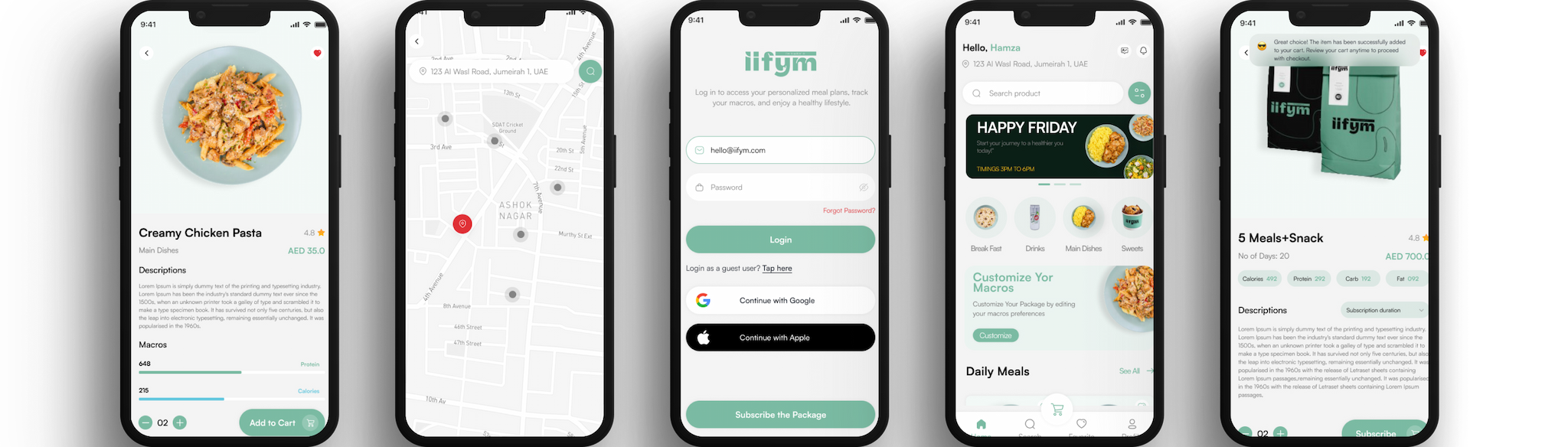
Today, we’re thrilled to share something big: a game-changing partnership between ConceptRecall and IIFYM! While IIFYM is already a household name in flexible nutrition planning, this collaboration goes beyond fitness.


By bringing ConceptRecall’s full-stack digital expertise, branding, strategy, mobile apps, web platforms, and data-driven solutions together with IIFYM’s nutrition innovation, we’re about to revolutionize personalized health, nutrition, and digital experiences.


Meet IIFYM: Redefining Nutrition Plans


IIFYM specializes in personalized nutrition, helping users achieve their goals, whether bulking, weight loss, or simply improving diet. With its smart macro calculator, users can avoid certain foods (like seafood or spicy meals) and still enjoy customized plans that match their lifestyle.


ConceptRecall: Powering Business Growth through Tech


As the best software house in Karachi, Pakistan, ConceptRecall has been delivering cutting-edge solutions for over a decade. We’ve:


  • Successfully completed 116+ projects
  • Helped clients generate $12M+ in revenue
  • Partnered with 100+ businesses worldwide


Our expertise goes far beyond app development. We design innovative web platforms, e-commerce solutions, UI/UX, digital marketing, and data engineering, ensuring our clients stay ahead in a competitive market.


A Partnership Sparked at GITEX 2023


The story began at GITEX 2023 in Dubai, where our team met IIFYM’s founders. We immediately connected over a shared vision, making nutrition more personalized, engaging, and accessible worldwide. That’s when the idea for this powerful collaboration was born.


Tailoring Nutrition to Every User


Many nutrition platforms follow rigid, one-size-fits-all plans that fail to adapt to individual lifestyles. Together, ConceptRecall and IIFYM are solving this by creating a personalized nutrition platform that adapts to user preferences, makes healthy eating fun, and keeps users motivated on their journey.


The Tech Stack Driving IIFYM’s Success


In this collaboration, ConceptRecall is delivering way more than just fitness solutions. We’re providing IIFYM with a full suite of digital services, including a sleek mobile app, an intuitive web app, branding, and strategic consulting to ensure IIFYM leads the market. The app will be built using React, React Native, and Node.js. These technologies are chosen for their flexibility and efficiency:


  • Mobile App: Built with React Native for seamless performance across iOS and Android, offering users a smooth and intuitive experience no matter their device. The hybrid platform help business to grow with minimal efforts required at the technology side. They will focus on business more instead of managing multiple apps across different platform
  • Web App: Created with React to give IIFYM full control through an easy-to-use admin portal, making content management and user engagement simple. We will utilize the power of React to build out the CMS portal from where they can easily manage their operations, orders and their subscription.
  • Backend: Powered by Node.js and microservices for lightning-fast responses and scalable growth. The microservice architecture help them to reduce the manual efforts and service perform all their business operations smoothly. The node architecture help the business to scale in future and add more features easily without effecting the current business
  • Database: MongoDB is a NoSQL database that stores data in flexible, JSON-like documents, making it particularly well-suited for application. It helps in rapid development and scaling application. This combination makes MongoDB a powerful choice for modern web applications, enhancing performance and responsiveness.
  • Cloud Hosting: Everything runs on Amazon Web Services (AWS), guaranteeing top-notch security, reliable performance, and the ability to scale as IIFYM’s user base expands.
  • Multilingual: Incorporating multilingual support in IIFYM mobile app significantly enhances user experience by making content accessible to a diverse audience. It allows users to interact with the app in their preferred language, improving engagement and satisfaction. Additionally, multilingual features can help businesses reach broader markets, fostering inclusivity and ensuring users feel valued regardless of their language background.


Beyond the tech, we’re also helping IIFYM with brand strategy, design innovations, and user experience enhancements, making the platform even more engaging, accessible, and fun for users all over the world.


The Outcome: Nutrition Like You’ve Never Seen Before


The result? A beautifully designed app that gives users total control over their nutrition. Whether you want to avoid certain foods or track your macros in real time, the app offers fully customizable plans to fit your lifestyle. And with real-time feedback, progress tracking, and flexible options, it’s easier than ever to reach your health goals.


Want to learn more? Visit the IIFYM website at iifym

Expanding to the Middle East


This partnership isn’t limited to technology, it’s also about global growth. IIFYM is expanding into the Middle East, starting with Dubai and Saudi Arabia, to meet the rising demand for personalized digital health solutions in the region.


Looking Ahead: The Future of Personalized Health


This partnership is just the beginning! With ConceptRecall and IIFYM joining forces, the future of personalized health, wellness, and digital experiences looks brighter than ever.


If you’re a business owner looking for digital growth, contact us for buying, queries, or custom digital solutions, ConceptRecall is here to help your brand thrive.

Your Success is Our Success | The ConceptRecall Approach

As the best software house in Karachi, Pakistan, we proudly serve clients not only in Karachi but across the globe. From startups to established enterprises, our team is passionate about creating innovative digital solutions that solve real business challenges, drive growth, and open new opportunities.


At ConceptRecall, we don’t just build software; we build success stories. Our philosophy is simple yet powerful: your success is our success. Every project we take on is more than just a contract; it’s a partnership built on trust, innovation, and results. Whether you’re a startup looking for scalable solutions or an established business aiming for digital transformation, our approach ensures we grow alongside you.


“Too many companies forget a simple truth: success wouldn’t exist without their clients, but we won’t forget.”


At ConceptRecall, we do things differently. For us, success isn’t about building our empire, it’s about helping you achieve your goals. Your wins are what drive us, and we believe that’s the foundation of true success.


Why We Prioritize Your Success Over Ours


Most digital and tech companies emphasize their growth by chasing industry recognition, revenue milestones, and long-term expansion. But what fuels those achievements? Their clients.


At ConceptRecall, we flip the script. Instead of focusing on our success, we focus on yours. Your growth, satisfaction, and milestones are what push us to innovate, improve, and deliver results that exceed expectations.


The ConceptRecall Approach


Our approach is built on three pillars:


  • Partnership First: We work with you, not just for you. This means active collaboration, open communication, and a commitment to your long-term vision.


  • Innovation with Purpose: Technology for the sake of technology doesn’t drive growth. We create customized, user-friendly, and scalable solutions designed to solve real-world problems.


  • Results that Speak: From improved efficiency to increased sales, we focus on outcomes. Our success is measured by how much closer we bring you to your business goals.


A Happy Team Creates Outstanding Results


Behind every successful company is a dedicated, motivated team. We believe that when our employees feel valued, they produce their best work for you.


That’s why we foster a culture of creativity, collaboration, and innovation. Through regular brainstorming sessions, open communication, and an environment that nurtures fresh ideas, our team stays ahead of the curve, ensuring you get solutions that are not just effective but game-changing.


Our diverse team of analysts, designers, developers, project managers, and writers shares one mission: to listen deeply and understand both your spoken and unspoken needs. We go beyond the obvious to solve challenges and create tailored solutions that align with your vision.


Our Process: Listen, Innovate, Deliver


Great results start with great communication. That’s why our approach begins with listening. We take the time to understand your unique needs, challenges, and aspirations.


Instead of offering cookie-cutter solutions, we craft strategies that align with your goals, whether it’s developing a high-performing website, designing a seamless mobile app, or strengthening your brand’s online presence.


We don’t just meet expectations; we shatter them. Every project is a fusion of your vision and our expertise, designed to maximize impact and success.


How We Drive Your Success


  • Custom Web Applications tailored to your industry needs
  • Mobile App Development with seamless UI/UX
  • ERP & Cloud Integration to streamline your operations
  • Scalable Digital Solutions that adapt as you grow


Our team ensures that every digital product we deliver is not only innovative but also practical and revenue-driven.


Our Biggest Reward? Your Success


For us, the true measure of success isn’t awards or accolades it’s seeing you thrive. Every website we launch, every mobile app we develop, and every brand we elevate is a testament to our commitment to your success.


At ConceptRecall, we succeed when you do. Your wins are our wins and that’s what keeps us motivated, driven, and dedicated to delivering excellence.


Frequently Asked Questions (FAQs)


1. What makes ConceptRecall different from other agencies?

Unlike many firms that focus on their growth, we put our clients first. Your success is our priority, and we work collaboratively to help you achieve it.


2. How does ConceptRecall ensure client satisfaction?

We listen first and create second. Our process involves deep understanding, innovative thinking, and personalized solutions tailored to your specific needs.


3. What services does ConceptRecall offer?

We specialize in website development, mobile app creation, UI/UX design, e-commerce solutions, and branding services helping businesses build strong, impactful digital presences.


4. What role does innovation play at ConceptRecall?

Innovation is at the core of everything we do. We combine fresh ideas with advanced technology to create custom solutions that push boundaries and drive success.


5. How does ConceptRecall measure success?

Our benchmark for success is simple: your growth. We gauge our achievements based on the results we deliver for our clients, not industry awards or titles.


6. How can I get started with ConceptRecall?

Let’s bring your vision to life! Contact our experts today or give us a call for a free consultation. Let’s build something incredible together.


Take the First Step Toward Success


Your goals are within reach, and we’re here to help you achieve them. Whether you need a stunning website, a cutting-edge mobile app, or a brand strategy that sets you apart, ConceptRecall is ready to make it happen.


Let’s talk!

Cross-Platform App Development Made Easy

Businesses must provide smooth mobile app experiences that work across multiple platforms. Whether it’s iOS or Android, users expect a smooth and consistent experience. Cross-platform app development services ensure that your business can deliver an excellent app that reaches a broader audience, no matter which device they use. As a business, you must ensure your mobile app delivers a seamless, consistent experience across platforms.


This is where cross-platform mobile app development services come in. Instead of building two separate apps for iOS and Android, businesses can leverage a single codebase to create apps that run smoothly on both. The result? Reduced costs, faster launches, and broader audience reach.


At ConceptRecall, we specialize in cross-platform mobile app development, helping businesses in Karachi and beyond extend their reach efficiently, affordably, and effectively.


What is Cross-Platform App Development?


Cross-platform mobile app development is the process of building apps that work across multiple operating systems, most commonly iOS and Android, using a shared codebase. This approach ensures that businesses can:


  • Deliver apps faster
  • Maintain consistency across devices
  • Cut down on development and maintenance costs


Why Cross-Platform App Development Services Are Essential


Digital consumers are now accustomed to switching between different devices and platforms. To meet their expectations, businesses must ensure their apps work seamlessly on multiple operating systems. Cross-platform mobile app development services provide an efficient way to develop apps that function optimally on both iOS and Android.


1. Maximize Audience Reach

By choosing cross-platform app development services, you can ensure that your app is available to the widest possible audience. Launching your app across both iOS and Android simultaneously means your business can tap into a larger market from day one.


2. Reduced Development Costs and Time

Instead of developing separate apps for iOS and Android, a cross-platform mobile app development approach uses a single codebase, saving you both time and money. This unified development method significantly reduces the need for separate maintenance and testing.


3. Consistent User Experience Across Devices

One of the major advantages of cross-platform app development services is the ability to provide a consistent and uniform user experience. By developing a single app that functions seamlessly across both iOS and Android platforms, businesses ensure their brand’s identity remains strong and consistent.


4. Simplified App Maintenance

With cross-platform mobile app development, updates and bug fixes are handled through a single codebase, which simplifies ongoing maintenance. This reduces the resources required to keep your app running smoothly on multiple platforms.


Leading Technologies in Cross-Platform App Development


The growth of cross-platform mobile app development has been fueled by a variety of technologies. At ConceptRecall, we leverage cutting-edge frameworks to ensure that businesses can quickly and efficiently deliver high-quality apps. Here are the top frameworks we use:


Flutter: Google’s Powerful Toolkit

Flutter allows us to create natively compiled apps for mobile, web, and desktop from a single codebase. It’s fast, high-performance, and offers excellent flexibility, making it a top choice for cross-platform mobile app development services.


React Native: Built by Facebook

With React Native, developers can use JavaScript to build robust apps that feel native across both iOS and Android. It’s widely popular and ideal for businesses looking for cost-effective solutions in cross-platform app development services.


Xamarin: Microsoft’s Cross-Platform Solution

Xamarin allows businesses to develop high-quality apps with a native feel by using C# and NET. It integrates seamlessly with both iOS and Android, making it a preferred framework for cross-platform mobile app development.


Overcoming the Challenges of Cross-Platform App Development


While cross-platform app development services offer many benefits, businesses should be aware of potential challenges and how to address them effectively:


1. User Experience Challenges

Generic design solutions can sometimes impact the app’s native feel. At ConceptRecall, we work closely with experienced designers to maintain platform-specific design elements, ensuring your app feels native on both iOS and Android.


2. Performance Limitations

Cross-platform apps can sometimes face performance issues, but modern frameworks like Flutter and React Native help mitigate these concerns. Our developers optimize app performance to deliver the best experience possible.


3. Integration Issues

Integrating with native APIs or third-party services may present challenges. Our team’s deep understanding of both native and cross-platform mobile app development services ensures that integrations are seamless, reducing any functionality issues.


ConceptRecall’s Approach to Cross-Platform App Development


At ConceptRecall, we adopt a client-centric approach to cross-platform app development services. Here’s a step-by-step guide to our process:


1. Business and Idea Assessment

We start by understanding your business objectives, target audience, and feature requirements to ensure we’re building the right app for your needs.


2. UI/UX Design & Strategic Roadmap

We design intuitive, user-friendly interfaces and create a strategic roadmap to ensure your project progresses smoothly.


3. Development & Prototyping

We use industry-leading frameworks to build your app, with regular updates and prototypes to ensure alignment with your vision.


4. Rigorous Testing & Quality Assurance

We rigorously test your app on multiple devices to ensure performance, functionality, and a consistent user experience.


5. Launch & Ongoing Support

Once your app is ready, we assist with a smooth launch and provide ongoing support to ensure it continues to meet your business needs.


Success Stories: How Cross-Platform App Development Services Deliver Results


Leading brands like Instagram, Skype, Walmart, and Tesla have leveraged cross-platform mobile app development services to rapidly deploy high-quality apps across iOS and Android, leading to increased user engagement.


Locally, ConceptRecall has helped Karachi-based and international businesses smooth their app development process, resulting in cost savings and quicker deployments.


Why Choose ConceptRecall for Cross-Platform Mobile App Development Services?


  • Proven Expertise: Our team has years of experience in cross-platform mobile app development.
  • Custom Solutions: We provide tailored app development strategies that align with your business objectives.
  • End-to-End Service: From development to launch and ongoing support, we handle every aspect of your app’s lifecycle.
  • Results-Oriented: Our apps are designed to increase user engagement and streamline your business operations.


Get Started with ConceptRecall’s Cross-Platform Mobile App Development Services


Today’s competitive digital environment, cross-platform mobile app development services are the key to staying agile and delivering excellent user experiences. At ConceptRecall, we are committed to helping businesses develop apps that reach a larger audience and provide a consistent, high-quality user experience.


Contact ConceptRecall today to learn more about how we can help your business thrive with our cross-platform app development services.


FAQs


Q1. What is the difference between native and cross-platform app development?

Native apps are built separately for iOS and Android, while cross-platform apps use one codebase to work on both.


Q2. Are cross-platform apps secure?

Yes, modern frameworks ensure strong security protocols, encryption, and compliance.


Q3. Which framework is best for cross-platform app development?

Flutter, React Native, and Xamarin are the leading choices depending on project requirements.


Q4. Is cross-platform development cost-effective?

Absolutely. It saves up to 40–50% compared to building separate native apps.


Q5. Can cross-platform apps integrate with native device features?

Yes, frameworks allow seamless integration with device features like GPS, camera, and push notifications.


Why Your Business Needs Enterprise Mobile App Development Services in 2025

The digital marketplace is moving faster than ever, and mobile apps are no longer just a “good-to-have”; they’re a must-have to stay competitive. In 2025, businesses that are not leveraging enterprise mobile applications will be behind. Whether you’re a startup or an established enterprise, mobile apps help you smooth out the operations, empower employees, and enhance customer engagement.


Let’s dive into why enterprise mobile app development services should be on your priority list this year.


What Are Enterprise Mobile Applications?


Enterprise mobile applications are sophisticated software solutions specifically designed for organizational use, enabling employees to access company resources, collaborate with team members, and perform work-related tasks from their mobile devices. Unlike consumer apps available on public app stores, these applications are tailored to meet specific business requirements and seamlessly integrate with existing enterprise solutions and legacy systems.


Mobile enterprise applications have become essential tools for organizations seeking to enhance productivity, improve communication, and streamline operations, serving as the foundation for digital transformation initiatives across industries.


The Rise of Enterprise Mobile App Development Services


The shift toward mobile-first strategies has made enterprise mobile app development services a critical priority for organizations worldwide. 92.5% of someone’s time on their phone is spent using mobile apps, and this trend extends beyond consumer behavior to enterprise environments, where businesses are increasingly recognizing the need for custom mobile solutions.


Modern enterprise mobile app development services encompass various approaches and technologies, from low-code and no-code platforms to sophisticated native development frameworks. 79% of enterprises are looking to develop mobile apps using citizen developers, highlighting the growing demand for accessible development solutions.


Key Features of Successful Enterprise Mobile Applications

1. Intuitive UI/UX Design

Professional user interface and user experience design are fundamental to the success of any enterprise mobile application. The best solutions prioritize user-centered design principles, creating interfaces that are both visually appealing and functionally efficient while reflecting corporate branding.

2. Cross-Platform Compatibility

Modern enterprise mobile application development services often leverage frameworks like React Native to create applications that work seamlessly across iOS and Android devices. This approach ensures all employees can access critical business functions regardless of their preferred device.

3. Robust Integration Capabilities

The ability to seamlessly integrate with existing enterprise solutions and legacy systems is crucial. A comprehensive mobile enterprise platform should support various integration methods, including APIs, webhooks, and middleware solutions that ensure data consistency across all platforms.

4. Real-Time Communication Features

Instant messaging, push notifications, and chat functions enable teams to communicate effectively and share real-time data. These features are particularly valuable for connecting field workers with office staff, ensuring everyone has access to the same information regardless of location.

5. Offline Functionality

Since mobile workers may not always have reliable internet connectivity, the best enterprise mobile apps include offline capabilities. This allows employees to continue working productively and sync data once connectivity is restored.


6. Advanced Security Measures


Security is paramount when dealing with enterprise data. Professional mobile app development services implement multiple layers of security, including:


  • Single sign-on (SSO) authentication
  • Data encryption at rest and in transit
  • Remote wipe capabilities for lost or stolen devices
  • Role-based access controls
  • Secure APIs for data transmission
  • Compliance with industry regulations (GDPR, HIPAA, etc.)

Types of Enterprise Mobile Applications

Management Enterprise Apps

Enterprise resource planning (ERP) apps are widespread among such business giants as Nestlé, Marc Jacobs, and Bosch. These applications manage and integrate all parts of business within one app, including planning, cost control, sales, marketing, and inventory management.

Field Service Management Apps

Designed for workers in the field, these applications provide access to work orders, customer information, and technical documentation while maintaining real-time synchronization with headquarters.

Human Resources (HR) Mobile Apps

HR applications include features for time tracking, leave management, employee onboarding, and performance reviews, streamlining operations by automating routine tasks and providing self-service options for employees.

Team Collaboration Software Apps

Team collaboration and communication apps like Slack, Asana, Liferay, and Monday.com help keep teams connected and synced on company milestones, offering benefits such as browser-based functionality, flexibility, and agile-focused features.

Leading Enterprise Mobile App Development Platforms

1. Low-Code/No-Code Platforms


Mobile Application Development Platforms (MADPs) offer faster development cycles, cost savings, scalability, and enhanced collaboration through pre-built tools and frameworks. Leading platforms include:


  • Alpha Anywhere: A robust low-code platform with strong database connectivity and offline functionality
  • Mendix: Known for rapid development and deployment with cloud-native architecture
  • Fliplet: Offers 16 solutions and over 300 customizable screens with drag-and-drop functionality

2. Cross-Platform Development Frameworks

  • React Native: Developed by Facebook, enables JavaScript-based development with native performance
  • Flutter: Google’s UI toolkit providing rich motion APIs and customizable widgets
  • Xamarin: Microsoft’s platform offering native API access with a C# codebase

3. Traditional Development Approaches

For complex applications requiring deep device integration, native development remains valuable, though it requires more resources and maintenance compared to cross-platform solutions.

Benefits of Enterprise Mobile App Development Services

Enhanced Productivity

By eliminating time-consuming manual processes and providing instant access to information, mobile enterprise applications significantly boost productivity. Employees can complete tasks faster, make informed decisions quickly, and collaborate more effectively.

Improved Data Management

With real-time data synchronization and centralized information management, organizations can ensure data consistency across all platforms, eliminating duplicate entries and reducing errors.

Scalability and Flexibility

A robust enterprise mobile app platform provides the scalability needed to grow with your organization, whether adding new users, implementing additional features, or expanding to new markets.

Cost Reduction

While the initial investment may be significant, the long-term cost savings are substantial. By automating processes, reducing errors, and improving efficiency, organizations can achieve significant ROI within months of implementation.

Current Trends in Enterprise Mobile App Development

1. Microservices Architecture

Microservices represent a style of app architecture structured from a collection of different services that can be independently deployable, built with different technologies, and have their own admin panels. This approach significantly speeds up production, increases system reliability, and enhances security.

2. Cloud-Based Services

Cloud-based enterprise apps have been slowly taking over the business world by reducing upfront cost and making those apps accessible for small and medium enterprises.

3. Artificial Intelligence Integration

AI and machine learning are taking enterprise app development to new levels, providing business insights, improving customer experience, and helping organizations stay ahead of the competition.

4. Big Data Integration

Modern enterprises generate vast amounts of data, making Big Data applications crucial for systematizing information and speeding up business processes.

Best Practices for Enterprise Mobile App Development

1. Start with Clear Business Goals

Define specific objectives and KPIs before beginning development to ensure the application delivers measurable value.

2. Prioritize User Research

Understanding your employees’ needs, workflows, and pain points is crucial to creating solutions that truly enhance their work experience.

3. Implement Iterative Development

Use agile methodologies to continuously improve the application based on user feedback and changing requirements.

4. Focus on Performance

Ensure applications perform well even on older devices and slower networks to maximize accessibility.

5. Plan for Maintenance

Partner with a reliable mobile app development company that provides ongoing support and updates to keep applications secure and functional.

Choosing the Right Development Approach

Cross-Platform Development

Using frameworks like React Native allows developers to create applications that work across multiple platforms from a single codebase, reducing development time and costs while maintaining good performance.

Native Development

Creating separate applications for each platform provides optimal performance and access to device-specific features but requires more resources and maintenance.

Progressive Web Apps (PWAs)

PWAs offer a web-based solution that provides app-like experiences without requiring installation from an app store, ideal for rapid deployment and easy updates.

Security Considerations for Enterprise Mobile Apps


Enterprise apps are very much connected with databases, and there have been multiple cases when these systems were hacked. Essential security measures include:

  • Authentication Controls: Multi-factor authentication (2FA) requiring users to go through multiple phases of verification
  • Permission-Based Access: Opening specific data only to accounts permitted to see that information
  • Safe Key Storage: Keeping access keys in secure storage to prevent third-party intrusions


Why Outsource Enterprise Mobile App Development Services?


Developing a secure and scalable app requires expertise. Partnering with professionals ensures:

  • Access to skilled developers and UX experts
  • Use of the latest frameworks and technologies
  • Cost-effective solutions compared to in-house teams
  • Ongoing support, updates, and maintenance


If you’re looking to build a secure, scalable, and future-ready app, contact us for enterprise mobile app development services. We’ll help you design, develop, and scale solutions tailored to your business needs.

The Future of Enterprise Mobile Applications


As technology continues to evolve, enterprise mobile applications are incorporating advanced features such as artificial intelligence, augmented reality, and IoT integration. These innovations promise to further enhance user experiences and create new possibilities for achieving business goals.


Platforms often include features to support growing user bases and integration with enterprise-level systems, with monitoring and analytics tools for tracking app performance and user engagement.

Conclusion


Enterprise mobile app development services represent a crucial investment in organizational efficiency and employee satisfaction. By choosing the right development platform, prioritizing user experience, and ensuring seamless integration with existing systems, businesses can create effective mobile solutions that boost productivity, improve collaboration, and help achieve important business goals.


The key to success lies in selecting appropriate technology stacks, working with experienced development teams, and focusing on creating applications that empower employees while protecting sensitive enterprise data. As mobile technology continues to evolve, organizations that invest in robust enterprise mobile app development services today will be better positioned to adapt to future challenges and opportunities, ensuring they remain competitive in an increasingly mobile-first business landscape.


Whether you opt for low-code platforms, cross-platform frameworks, or native development approaches, the focus should always be on creating applications that deliver real business value while providing exceptional user experiences that drive adoption and engagement across your organization.


Ready to future-proof your business? Contact us today for enterprise mobile app development services and let’s build a solution that grows with you.


FAQs


Q1: What is the difference between a consumer app and an enterprise app?

A consumer app targets end-users, while an enterprise app is designed to streamline internal operations and business processes.


Q2: How long does it take to develop an enterprise mobile app?

It depends on complexity, but on average, development can take anywhere from 3 to 9 months.


Q3: Are enterprise mobile apps secure?

Yes, they include data encryption, multi-factor authentication, and compliance features to ensure business security.


Q4: Can small businesses also benefit from enterprise mobile apps?

Absolutely. Enterprise apps are scalable, meaning even small businesses can adopt them and grow.


Q5: How much does enterprise mobile app development cost in 2025?

The cost varies depending on features, platform (iOS, Android, cross-platform), and level of customization

Why Clickable Prototypes Are the New Essential Tool for App Developers in 2025

Imagine being able to test your app idea before writing a single line of code. With clickable prototypes, this is now a reality. These interactive mock-ups are helping developers and designers validate ideas, perfect user flows, and avoid costly mistakes, all before the development process truly begins.


In this post, we’ll delve into why clickable prototypes have become a game-changer in app development, explore how they enhance collaboration, and discuss how they expedite the journey from idea to successful launch.


Contact ConceptRecall’s expert app development team today to build powerful clickable prototypes, streamline your app journey, and bring your ideas to life with speed and precision.


What Are Clickable Prototypes?


Clickable prototypes are interactive mock-ups of a mobile application that showcase the user interface and overall user experience without requiring code. They simulate the flow of the actual app, allowing stakeholders to visualize and interact with the product as if it were live.

The Importance of Prototyping in App Development


Creating a prototype plays a key role in early-stage app development. Here are a few reasons why:


  • Validation of Ideas: Prototypes enable teams to test their ideas with real users, gathering valuable feedback before investing time and resources into full-scale development.
  • Reduce Rework: By identifying design flaws early in the process, teams can make necessary adjustments, thereby avoiding costly changes during later stages of development.
  • Enhanced Collaboration: Prototyping fosters better communication among team members and stakeholders, aligning everyone on the app’s vision and objectives.

Benefits of Clickable Prototypes

Utilizing clickable prototypes offers several compelling benefits:

  • Faster Time to Market: With a clear understanding of user needs and preferences, teams can develop products that resonate with their target audience more quickly.
  • Improved User Experience: By incorporating user feedback early, developers can create a more intuitive and user-friendly experience.
  • Cost-Efficiency: Early detection of issues prevents unnecessary spending on development and redesign.

Best Practices for Creating Clickable Prototypes


To make the most out of clickable prototypes, consider following these best practices:

  • Keep It Simple: Ensure your prototype focuses on essential features and functions, avoiding unnecessary complexity.
  • Gather Feedback: Encourage collaboration and solicit opinions from all stakeholders to refine the prototype further.
  • Iterate Rapidly: Don’t hesitate to make changes based on user feedback. Iteration is a key aspect of effective prototyping.


Real-World Case Study: How Clickable Prototypes Saved Time for IIFYM App

Let’s take a look at how the IIFYM (If It Fits Your Macros) food app, a popular platform for tracking macronutrient intake, used clickable prototypes to fast-track its development process.

Before Prototyping:

The IIFYM app, which simplifies macronutrient tracking and offers personalized meal recommendations, faced challenges in ensuring a seamless user experience. Their development team struggled with validating user flows, refining the user interface, and aligning stakeholder expectations before full-scale development began.

After Prototyping:


By creating a clickable prototype early in the design process, IIFYM was able to:

  • Gather user feedback: Real users interacted with the prototype, providing feedback that helped refine the app’s interface and navigation.
  • Test critical features: With the clickable prototype, the team tested key features, such as meal recommendations, subscription management, and the food database navigation, without the need for writing code.
  • Ensure alignment with business goals: The prototype helped stakeholders visualize the app’s functionality and user flow, which led to better collaboration and fewer revisions during later stages of development.


As a result, IIFYM reduced development time by 30%, launched faster, and received positive feedback on the app’s usability and intuitive design.


Visualize Your Prototype

Sometimes words aren’t enough to explain the power of clickable prototypes. Here’s a visual example of a clickable prototype in action:


Clickable prototypes like this one allow teams to simulate user flows and collect feedback quickly.

Conclusion: Why Clickable Prototypes are a Must for Modern App Development


Clickable prototypes are undoubtedly transforming the app development landscape. By validating ideas early, minimizing rework, and enhancing collaboration, they pave the way for faster and more successful launches. Embracing this innovative approach can lead to improved user experiences and ultimately contribute to the success of your mobile app in a competitive market.


Get Started Today: Ready to build your first clickable prototype? Fill out the contact form to create interactive mockups that will streamline your development process.